|  | July 15, 2024
KUBIC is a Nintendo-themed, 3D Printable Mini-ITX case September 05, 2017
Choosing the right DC-DC PSU August 27, 2015
AMD's Project Quantum August 13, 2015
The Redstone PC is the ultimate Mini-ITX Minecraft Machine October 09, 2014
The "Restomod TV" April 09, 2013
Installing NAS4Free February 28, 2013
Building an XBMC 12 Home Theatre PC January 25, 2011
XBMC Guide updated to version 10.0 August 06, 2010
Building a Green PC February 15, 2010
Building an ION powered HTPC with XBMC |
| | | | October 10, 2008
The "Cambridge Autonomous Underwater Vehicle 2008" September 12, 2008
"Florian", the DVD burning robot September 05, 2008
The "i-EPIA" May 22, 2008
The "GTA-PC" April 14, 2007
The "Digg" Case January 19, 2007
The "ITX-Laptop" December 07, 2006
The "Tortoise Beetle" October 02, 2006
The "DOS Head Unit" August 31, 2006
The "Janus Project" August 05, 2006
The "Leela PC" June 26, 2006
Nano-ITX in a Football May 17, 2006
The "EPIA Alloy Mod" April 11, 2006
Neatorama's Collection of Case Mods February 18, 2006
The "Rundfunker" October 24, 2005
The "ITX TV" October 06, 2005
The K'nex-ITX August 05, 2005
The "Waffle Iron PC" July 21, 2005
The "Supra-Server" July 18, 2005
The "Mega-ITX" July 07, 2005
The "Encyclomedia" |
| | | | May 25, 2005
The "Accordion ITX" May 16, 2005
The "FileServerRouterSwitch" May 15, 2005
The "Mini Falcon" May 13, 2005
The "Bender PC" May 11, 2005
The "BBC ITX B" May 10, 2005
The "Frame" April 20, 2005
The "Jeannie" March 09, 2005
The "Cool Cube" January 30, 2005
First Nano-ITX Project? January 17, 2005
The "iGrill" January 15, 2005
The "Gumball PC" December 15, 2004
The "Deco Box" December 03, 2004
The "TERA-ITX" October 06, 2004
The "Coealacanth-PC" September 17, 2004
The "Gramaphone-ITX-HD" August 26, 2004
The "C1541 Disk Drive ITX" August 25, 2004
The "SEGA-ITX" August 13, 2004
The "Quiet Cubid" August 06, 2004
The "BMWPC" July 14, 2004
The "Moo Cow Moo" Full alphabetical archive on right hand side of page... |
|
|
The "SpacePanel"
By Bart
Banaan - Posted on June 29, 2002
2.
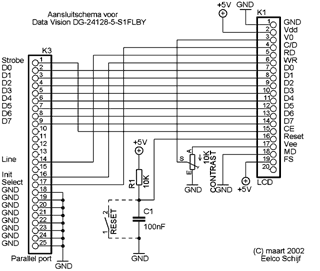
The Wiring Diagram
As the DataVision DG-24128-5-S1FLBY
has a Toshiba T6963c controller chip onboard, we will use
the wiring diagram below to connect the 20 pins of the LCD
connector to the LPT (parallel) port of your computer. With
many thanks to Eelco Schijf and his site at http://gfxlcd.schijf.org/
(dutch)
3.
The LCD Connection Cable
For connecting the Graphic
LCD screen to the parallel port we will use an LPT connector,
a big potentiometer for controlling the backlight, a small
potentiometer for controlling the contrast and some wires
with a header on a 2.5mm raster which will connect to the
20 pins on the Gfx LCD.
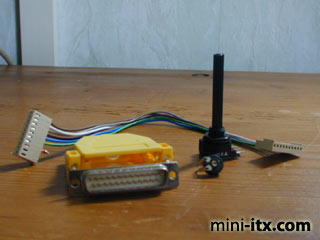
The LPT connector, the
potentiometers, some wires and the 10 pin headers - I used
2 x 10 pin headers, as a 20 pin header was hard to find.
After connecting and soldering the cable can
look something like this:
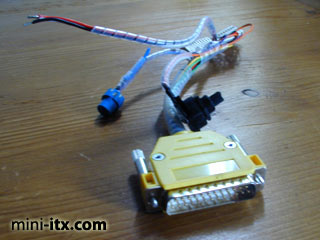
The LPT header with the wiring and the blue
reset button.
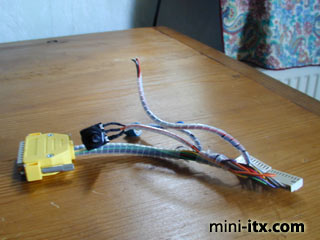
The wiring completed - on the left is the
LPT connector, on the right the headers.
|
|