

Posted on July 14, 2004
Introduction
|
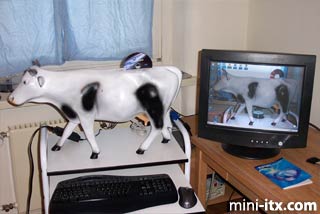
I found a hollow plastic cow at a monthly flea market at a Wal-Mart Parking lot in Wiesbaden, Germany. I thought it would be perfect for a Mini-ITX based computer. I grew up on a dairy farm in NY so I know a lot about cows. It was about a half hour into walking around the flea market. I looked at it and thought about it for 5 minutes. I bought it and had walk around the rest of the market. I carried the cow around the rest of the flea market for 2 hours. This was the third time I bought something heavy or awkward and had to carry it a long way to get to the car or home, when will I ever learn. It was not heavy but it was a bit awkward walking around the packed parking lot of Wal-Mart having all these German people go Moo or say something that I did not quite understand. I took 3 years of German in high school over 15 years ago. I do not remember much of it but I know bits and pieces.
|
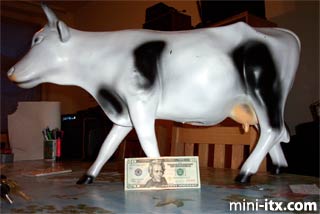
Anyway as you can see by the pictures it is 14 inches tall, 6 inches wide and 28 inches long. You can use the $20 bill in the picture as a scale.
Planning
|
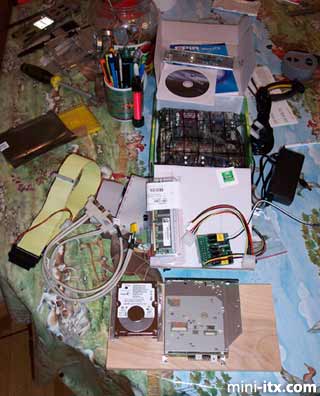
A few days later I get all the parts in the mail. 20Gb 2.5 in Hard drive, 256Mb DIMM, a slot-load CD R/RW DVD combo drive, a 44 pin to 40 pin IDE adapter for the CD drive, a laptop to standard IDE adapter for the hard drive, a Mini ITX mother board, a 12V power brick, and a PW120 200 Watt snap-in power supply. The picture shows all the parts laid out beforehand.
I have thought long and hard about how to put the computer and plugs into the cow. One friend wants me to make it so when you lift the tail it will turn on the computer. One wants me to put LEDs in the eyes and the power button in the butt. One wanted me to put the mouse and keyboard plugs on the bottom where the udders are and make it look like a milking machine that is hooked up to the cow. And they all want me to make it go moo when it boots up.
What I decided was to put a push button behind the ear on the back for the power button. I am going to use a wireless mouse and keyboard, borrowing the one from my desktop to get me started. Now I also will put the USB and FireWire ports in the back along the leg. I am going to try to run the power plug down inside one of the legs and put the connector on the bottom near the hoof so it will be less noticeable.
One thing I have not decided yet is where to run the monitor plug so it will not be noticed. I also think that mounting the motherboard on one side of a piece of plywood, the CD drive and hard drive on the other side will be the best way to mount the components inside the cow. There are no flat surfaces inside of the cow so I will have to make some custom brackets to mount the plywood inside. I want to put a speaker as close to the mouth as possible to it will sound like the sound it coming from the cows' mouth and yes it will moo when it starts up.
Construction
|
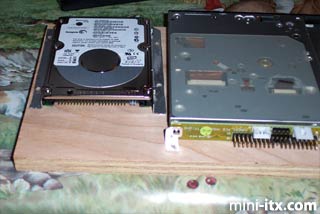
When I got down to working on it the first order of business was to make some custom brackets to hold the hard drive and CD drive in place on the centerboard. I made them out of some old aluminum that I had left after tearing my old laptop apart to make it into a digital picture frame.
|
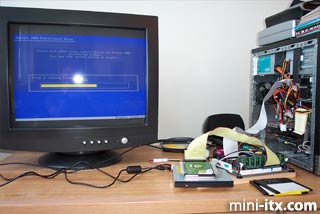
The next problem I found much to my chagrin that I could not install Windows 2000 from the CD. So I took the data cable for the floppy and hooked it to the floppy in my desktop. I left the drive in the desktop hooked up to the power supply from the desktop. I did not have an extra power cable on the components I put together. It worked fine and I installed Windows 2000 without a problem. Next I tried to install Office 2000 but my disk is bad. I tried a couple of times and decided to move on. I will work on that later.
|
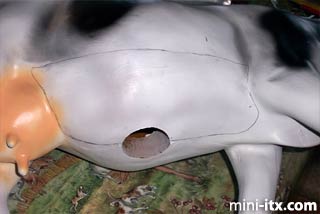
On Saturday morning I decided to work on the cow. I started about 0900. I used my Dremel to cut the cow open. As you can see by the pictures I used a pencil and drew a curved line on the cow where I wanted to cut.
 |
 |
 |
Quick Links
Mailing Lists:
Mini-ITX Store
Projects:
Show Random
Accordion-ITX
Aircraft Carrier
Ambulator 1
AMD Case
Ammo Box
Ammo Tux
AmmoLAN
amPC
Animal SNES
Atari 800 ITX
Attache Server
Aunt Hagar's Mini-ITX
Bantam PC
BBC ITX B
Bender PC
Biscuit Tin PC
Blue Plate
BlueBox
BMW PC
Borg Appliance
Briefcase PC
Bubbacomp
C1541 Disk Drive
C64 @ 933MHz
CardboardCube
CAUV 2008
CBM ITX-64
Coelacanth-PC
Cool Cube
Deco Box
Devilcat
DOS Head Unit
Dreamcast PC
E.T.PC
Eden VAX
EdenStation IPX
Encyclomedia
Falcon-ITX
Florian
Frame
FS-RouterSwitch
G4 Cube PC
GasCan PC
Gingerbread
Gramaphone-ITX-HD
GTA-PC
Guitar PC
Guitar Workstation
Gumball PC
Hirschmann
HTPC
HTPC2
Humidor 64
Humidor CL
Humidor II
Humidor M
Humidor PC
Humidor V
I.C.E. Unit
i64XBOX
i-EPIA
iGrill
ITX Helmet
ITX TV
ITX-Laptop
Jeannie
Jukebox ITX
KiSA 444
K'nex ITX
Leela PC
Lego 0933 PC
Legobox
Log Cabin PC
Lunchbox PC
Mac-ITX
Manga Doll
Mantle Radio
Mediabox
Mega-ITX
Micro TV
Mini Falcon
Mini Mesh Box
Mini-Cluster
Mobile-BlackBox
Moo Cow Moo
Mr OMNI
NAS4Free
NESPC
OpenELEC
Osh Kosh
Pet ITX
Pictureframe PC
Playstation 2 PC
Playstation PC
Project NFF
PSU PC
Quiet Cubid
R2D2PC
Racing The Light
RadioSphere
Restomod TV
Robotica 2003
Rundfunker
SaturnPC
S-CUBE
SEGA-ITX
SpaceCase
SpacePanel
Spartan Bluebird
Spider Case
Supra-Server
Teddybear
Telefunken 2003
TERA-ITX
The Clock
ToAsTOr
Tortoise Beetle
Tux Server
Underwood No.5
Waffle Iron PC
Windows XP Box
Wraith SE/30
XBMC-ION